


The focus on price at Google Shopping
Searchengineland.com has conducted extensive research focusing on how the product’s price influences the performance of Google Shopping. The analysis focused on data from a single e-commerce site with 700 products. The products reached more than 100,000 exposures in total. The idea was to increase the price by 43% to see which effect it would have on performance. The results were, as expected, not satisfying. A drop of 70% was seen in exposures compared to earlier periods. So, does price matter? The simple answer is: Yes.
Get more traffic with price optimisations
The falling number of exposures is a direct consequence of the fact that Google automatically down-prioritises products with a cost above the average market price point. This is not that strange. In essence, Google’s raison d’être is to deliver the best results possible to ensure the best user experience. This means that if you position yourself too far from your competitors’ price points, you will experience a fall in exposure. To sum up, there’s a clear correlation between price points and your ability to generate traffic through Google Shopping. This is where software such as PriceShape shows its true value. If you have the ability to always set a correct price point for your products, you will absolutely succeed in Shopping. Please take a look at some of our features here: PriceShape Software and Google Shopping optimisation.
The general tendency on Google Shopping
In addition to the above research conducted by Searchengineland, another analysis from the same site shows basically the same tendencies. A study was made based on 3,900 products and 6 million exposures. The results were clear: Products placed under the average market price had significantly better performance than the products placed above the average market price. In addition, products with above-average price positions also received fewer impressions, clicks, and conversions.
Optimise your price position
Now, let’s be realistic. We aren’t saying you should place your product price point somewhere at the bottom. What we’re saying is: Follow the market. Unless you’re consciously underbidding the market in an attempt to conquer it by using introductory price points or price skimming, you should place your price point around the middle position in most cases. Online shops need revenue and black numbers instead of red.
So, it’s unnecessary to be cheaper than all of your competitors, but prices in the middle range are favourable. As seen in the Searchengineland article, the way to get exposure and higher CTR, CPC, and conversions is by having the right price point.
This is where competitive pricing software comes into play again. Imagine having the ability to not worry about which kind of low-baller offer your competitors will have this week and how much revenue you will lose to their lower-than-average price points, since your prices are automatically updated. (Don’t worry; we’ve put in fail-safes if errors occur.)
Now, all of this could indicate that you should go below your competitors’ price position. This is, for more than one reason, not the favourite thing to do. As we’ve already mentioned, webshops need revenue. In addition to this, you’ll want to follow the market as long as there’s competition out there. Sometimes you want to avoid placing specific products on Google Shopping, sometimes you want to have a higher-than-average market price, and sometimes you want to have the highest price point since you’re the last shop with those specific items left. Options are endless, and we can help you optimise, specify, and get more out of your Shopping account.
Things we recommend:
- Identify your marginal cost on all products.
- Adapt your pricing strategies to your product cost margins. The lower your margin is, the more room you have for flexibility in your pricing strategies.
- Implement margin cost in your Google Shopping strategy using custom labels and your product margin.
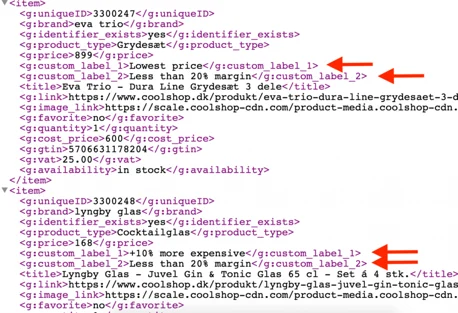
This is how you place your Google Shopping budget where it makes sense — specifically, where your prices are the most competitive, giving the best conditions for optimal performance.
We can help you optimise your price position at Google Shopping to be competitive in the market. All you have to do is send your Shopping feed in our direction. Then we will take care of the rest and identify where in the market you are competitive.